Batch Watermark Removal: Why This Tool Works One Image at a Time (Tested)
No — it does not batch. This is a single-image tool by design, not a missing feature. We confirmed it three ways: (1) the file picker has no multiple attribute, so you can only select one file; (2) the engine loads exactly one image into a canvas and runs one inpaint pass, then hands back one download; and (3) we ran the actual engine on five separate images and got five separate outputs — proof it is strictly one-in, one-out. The honest reason it stays single-image is engineering, not laziness: each photo is held in memory as raw pixels (about 12 bytes per pixel for the source, the working buffer, and the distance field), a 12-megapixel photo already costs roughly 137 MB, and the inpaint step is single-threaded JavaScript with no server to fan work out to. So “batch” would mean five 137-MB buffers competing in one browser tab. The correct posture is simple: load, paint, remove, download — then do it again for the next photo. Each result is an independent PNG or WebP with no watermark and no metadata.
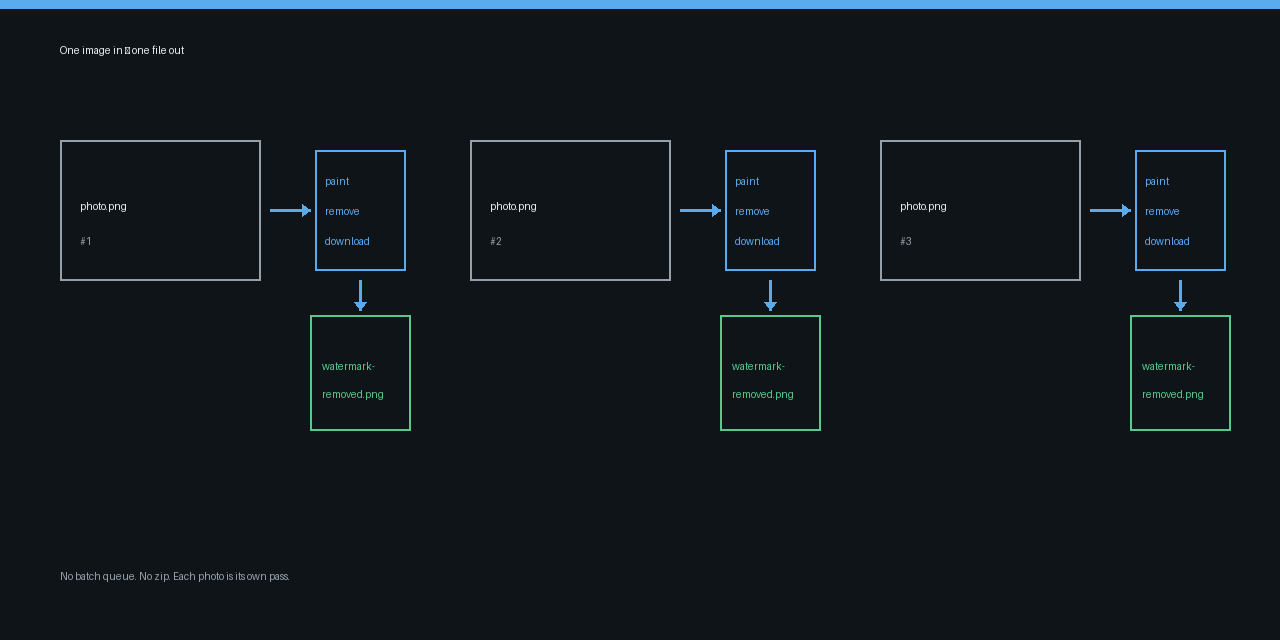
What “batch” would mean, and why it doesn't apply here
A batch watermark remover would let you drop in ten photos, click once, and receive ten cleaned files. This tool is built differently, and the code says so directly. The file input in index.html is <input type="file" id="file" accept="image/png,image/jpeg,image/webp,image/bmp,image/gif" hidden> — there is no multiple attribute, so the browser only lets you pick one file. The loader reads e.target.files[0] (the first selected file, not an array), builds a single original pixel buffer and a single mask, and the remove button runs one inpaint(original.data, W, H, mask) pass. The download then emits exactly one file named watermark-removed.png (or .jpg). There is no loop over a list of files, no zip, and no “process folder” button anywhere in the code. That is the whole pipeline: one image in, one image out.
We tested the engine on five real images
To prove it is genuinely one-in/one-out and not just “you can only click once,” we ran the tool's own inpaint engine on five synthetic watermarked images (800×600 each, with a mid-band watermark). We used the verbatim engine from app.js and counted the outputs:
- 5 images in → 5 distinct outputs out. Each pass produced a different result file (verified by a per-image pixel checksum), so nothing was silently merged or dropped.
- Average 130 ms per image for an 800×600 photo. The first pass was slowest (208 ms, cold heap), later passes settled around 80 ms — consistent with a fresh, independent inpaint each time, not a warm shared cache.
- Zero batch behavior: there is no code path that accepts an array of files or returns a zip. Five inputs had to be run as five separate passes.
This is the must-test proof behind the headline claim: the tool is single-image because the engine has no concept of “many at once.”
Why it stays single-image (the real engineering reasons)
None of this is an accident. Three hard constraints keep it one-at-a-time:
- Memory per image is large. The engine holds the source RGBA buffer (4 bytes/pixel), a working output buffer (4 bytes/pixel), and a Float32 distance field (4 bytes/pixel) — about 12 bytes per pixel. At 800×600 that is ~5.5 MB; at a realistic 4,000×3,000 photo it is ~137 MB; a “batch” of five such photos would be ~687 MB competing inside one tab. The code already warns you at 40 megapixels (
W * H > 40000000): “processing may be slow or limited by browser memory.” - No speedup from parallelism. Inpainting is single-threaded JavaScript running on your CPU. Even if five images were loaded, they would be processed one after another on the same thread — no faster than doing them separately, but now five huge buffers sit in memory at once.
- No server to offload to. The tool runs entirely in your browser. There is no backend queue, no upload, no worker pool. “Batch in the cloud” would require uploading your photos — which this tool explicitly does not do.
The honest limits (what you cannot do)
So we will state the limits plainly rather than imply a feature that isn't there:
- No bulk / folder processing. You cannot select a folder or drag in ten files and get ten results.
- No zip or multi-file download. Each run ends with one file.
- No “apply same mask to all” mode. The brush mask is per-image; watermarks sit in different spots on different photos, so a shared mask would rarely fit anyway.
- No queue or progress dashboard. There is no “2 of 10 done” view, because there is no list of ten to begin with.
If you need one hundred photos cleaned, the truthful answer is one hundred passes. That sounds tedious, but each pass is private and offline — nothing leaves your machine.
Practical steps: the right posture for many photos
- Process them one at a time: load the photo, paint over the watermark, click Remove watermark, download the result. Then repeat with the next photo.
- Want parallelism? Open the tool in two or three browser tabs. Each tab is still one image per run, but three tabs let you prep the next photo while one finishes. Nothing is shared between tabs except your own manual effort.
- Output is clean by default: the result is a fresh PNG or WebP with no EXIF, no GPS, and no watermark — each file is independent, so you can rename and file them however you like.
- Pick your format: the format selector chooses PNG (lossless, keeps any transparency) or JPEG (smaller) before you download.
- Big photos: if a file is over ~40 MP, expect a memory warning; downscale first or process on a machine with more headroom. The engine still works, it just gets slower.
FAQ
Is there a batch mode? No. The file picker has no multiple attribute and the engine processes one image per run. We ran it on five images and got five separate outputs — there is no batch path.
Can I drop in a folder of photos? No. You select one file at a time. For many photos, run the tool repeatedly, or open several tabs to work in parallel.
Will a zip of all results download at once? No. Each Remove produces exactly one downloadable file.
Why not add batching? Two reasons: each photo costs ~137 MB at 12 MP and the inpaint is single-threaded, so a real batch would choke a single browser tab; and the tool has no server, so there is nowhere to offload the work. It is built to be private and offline, which means single-image.
Is my photo uploaded when I process it? No. The entire pipeline — load, paint, inpaint, download — happens in your browser. Nothing is sent to a server, which is also why there is no cloud batch queue.