Erase EXIF Data (Tested): Six Deletion Paths, Three That Leak
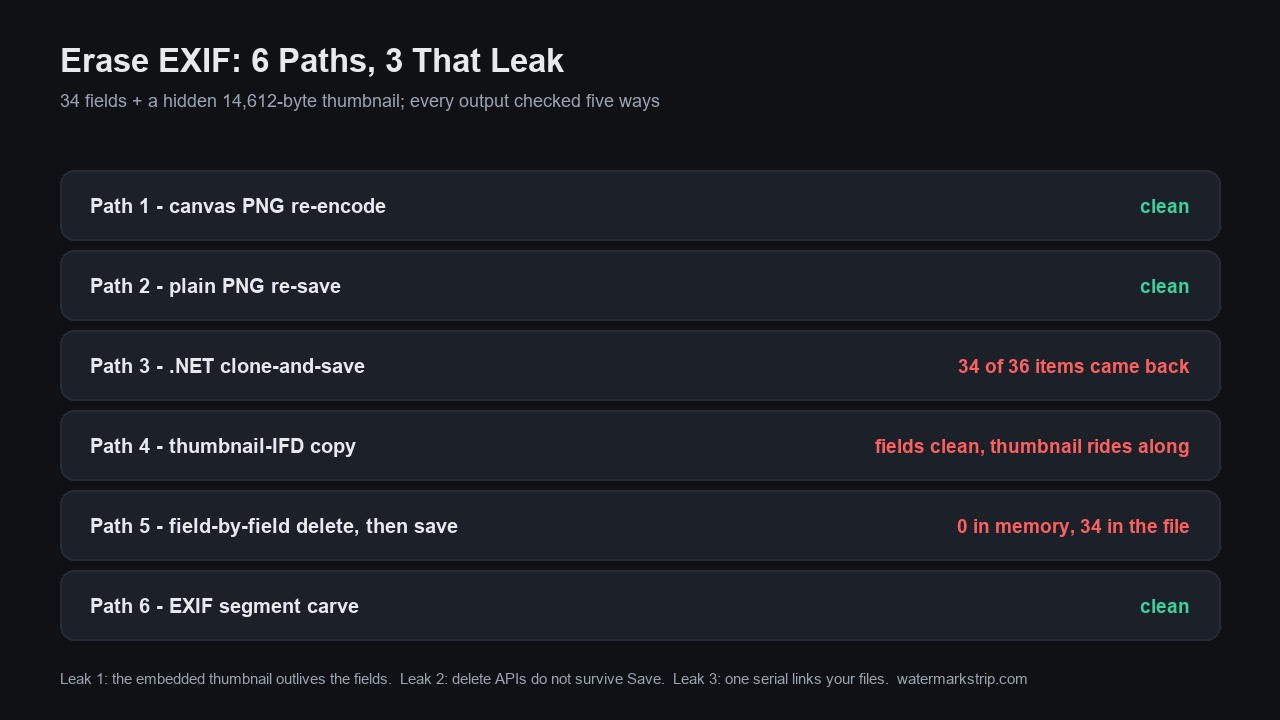
Re-saving as PNG erases every EXIF field - but "erase EXIF" is not one operation, and the path you pick decides whether it actually happens. We wrote 34 EXIF fields plus a hidden 14,612-byte embedded thumbnail into a test photo, ran six deletion paths people really use, and inspected every output five ways. Results: canvas PNG re-encode, plain PNG re-save, and a dedicated EXIF carve left zero fields, with pixels bit-identical to the source. But the Windows-native paths leak: .NET clone-and-save shipped 34 of 36 property items straight back out; a thumbnail-preserving "clean export" read zero fields in every viewer while carrying a full preview of the erased image inside the file; and GDI+ field-by-field delete emptied the collection to 0, then the saved file contained 34 fields anyway. Below: the full scoreboard, the three leak mechanisms, and a five-minute check for your own files.
The test photo: 34 fields, and a hidden picture inside
We built a synthetic 800x600 JPEG (78,915 bytes) with Pillow and piexif, writing the field set a real phone camera writes - 12 IFD0 fields, 14 EXIF-IFD fields, 8 GPS fields: 34 total - plus a 14,612-byte embedded JPEG thumbnail in the EXIF 1st IFD (that is the preview photo apps decode). The dangerous ones we made sure to include: BodySerialNumber SN8675-309X, UserComment 'Shot at the home gym, back door', ImageUniqueID a3f9c2e1d5b77, Artist and Copyright, and a full GPS block: 31°13'24.02"N, 121°28'12.00"E, altitude 12 m, WGS-84, 12 satellites. The main pixels show an internal document with the CONFIDENTIAL stamp already erased - but the embedded thumbnail still shows the original, stamped scene. We did that on purpose, for Leak 1 below. Full disclosure: this is a synthetic photo - the field names are what cameras write, the values are ours.
The scoreboard: six deletion paths, five inspections each
Every output was checked with five independent inspectors: a PIL field count, a piexif per-IFD load, a JPEG segment walk (APP1/APP13/COM), a scan for a second SOI marker (embedded JPEG thumbnail), and a GDI+ PropertyItems readback. Verdicts:
- Path 1 - canvas PNG re-encode (what an in-browser tool's export does): all 34 fields gone, no EXIF container, chunks reduced to IHDR/IDAT/IEND, thumbnail gone, pixels bit-identical to the source.
- Path 2 - plain PNG re-save (any desktop editor, export as PNG): identical result, same 130,081-byte output as Path 1.
- Path 3 - .NET clone-and-save (open Bitmap, Save - the default edit-and-save in most Windows utilities): the source carried 36 PropertyItems, the output carried 34. EXIF rebuilt: 12 IFD0 + 11 EXIF + 8 GPS fields, an 856-byte APP1 segment, GPS still decoding to the same map pin. The serial number was dropped - but
UserCommentsurvived. - Path 4 - thumbnail-IFD copy (a photo-library style "clean export" that keeps compatibility): IFD0, EXIF and GPS all read zero - every metadata viewer shows clean - but a 14,664-byte APP1 carrying the 14,612-byte embedded JPEG of the pre-erase scene rides along.
- Path 5 - field-by-field delete, then save (RemovePropertyItem on all 36 items): the in-memory collection read 0 - and the saved file carried 34 PropertyItems anyway, including
BodySerialNumberandLensModel, which Path 3 had dropped. - Path 6 - EXIF segment carve (what dedicated metadata removers do): exactly the 15,458-byte APP1 segment removed and nothing else touched - 78,915 down to 63,455 bytes - zero fields, thumbnail gone, pixels bit-identical (max channel difference 0).
Leak 1: the embedded thumbnail outlives every field you delete
Path 4 is the dangerous one because it passes every casual check. A metadata viewer lists IFD0/EXIF/GPS fields - all zero here. But EXIF stores a second, complete JPEG inside the file (the 1st IFD thumbnail), and that thumbnail is a picture from the past: it was written when the file was created, before the stamp was erased from the pixels. We extracted it (14,612 bytes) and counted 47 pixels of the red CONFIDENTIAL stamp in it. The main image was clean; the file still contained a full preview of what was removed. Viewers miss it because they enumerate fields, not embedded JPEGs - the thumbnail only shows up in apps that render previews. Scripts miss it because plenty of clear-EXIF recipes zero the main IFDs and copy the rest of the structure for compatibility - which is exactly how this trap is built.
Leak 2: Windows field-delete APIs don't survive the Save
Path 5 is the one that burns developers. Our GDI+ receipt, verbatim: gdi_fieldwipe_PropertyItems_after_delete: 0, then gdi_fieldwipe_out_PropertyItems: 34. We removed every PropertyItem - the collection read 0 immediately after - called Save, and the file on disk carried 34 items: the full GPS block still decoding to 31.2233, 121.4700, UserComment intact, and BodySerialNumber plus LensMake/LensModel resurrected - fields the plain clone path (Path 3) had actually dropped. We observed this on System.Drawing (GDI+) via Windows PowerShell 5.1 on Windows 11; we are not claiming every .NET version behaves identically. The engineering lesson holds regardless: a delete-the-fields code path that does not end in a pixel-level re-encode is not a deletion method. Deletion happens when new image data is written by an encoder that has no metadata to write - not when an in-memory collection is emptied.
Leak 3: one serial number links photos you erased separately
We wrote the same BodySerialNumber (SN8675-309X, same Make/Model) into two unrelated photos: a gym selfie dated day 1 and a roof photo dated day 2. Different scenes, different days, no GPS in either. Suppose the gym photo leaks your identity - the serial in it now labels every other file from that same camera, including the ones you erased and shared as anonymous. That is why "does THIS photo leak" is the wrong question: the unit of risk is the camera, not the file. The linking fields are not exotic - our test photo carried ImageUniqueID alongside Make/Model/LensModel, and any stable combination works as a thread to pull.
What actually works, ranked
1. Re-encode to PNG. Both PNG paths deleted all 34 fields and the thumbnail, and left pixels bit-identical (max channel difference 0). This is the same mechanism an in-browser tool uses on export: the canvas re-encodes the pixels into a fresh file, and there is no EXIF to carry over. Our own export path is code-verified for this: app.js contains zero occurrences of 'exif', 'APP1' or 'PropertyItem' - the tool never parses or copies metadata in the first place (the tag-by-tag survival test: Does Watermark Removal Keep EXIF Data?).
2. Segment carve. The dedicated-remover path (Path 6) is the cleanest JPEG-to-JPEG option: it removed exactly the 15,458-byte APP1 segment and nothing else - pixels bit-identical, smallest possible change to the file.
3. What to never trust: utilities whose save path is open-tweak-Save through a system graphics library (Path 3), field-wipe APIs without a final re-encode (Path 5), and anything that keeps photo-library compatibility by default (Path 4). And a JPEG re-save is only as clean as the code behind it: in this run, every clean JPEG came from an explicit carve; every JPEG that went through a graphics library's default save came out with metadata. For the field-level risk picture and prevention habits: How to Clear Metadata from a Photo.
Set expectations on the payoff, too: what you recover is fixed overhead, not a share of the file. In our space test the EXIF + GPS + thumbnail block came to 3.4 KB, which was 6.1% of a 52 KB photo and 0.5% of a 630 KB one — the same bytes either way (how much space does stripping metadata save). Strip to stop the leak, not to reclaim storage.
Check your own file in five minutes
After any erase, run all four on the OUTPUT file, never the original:
- Field read: open the file in any EXIF viewer. Zero IFD0/EXIF/GPS fields is the baseline, not the finish line.
- Thumbnail scan: look for a second JPEG inside the file - search for the byte sequence FFD8FF appearing twice in a hex viewer, or extract with
exiftool -b -ThumbnailImage file.jpg. Path 4 fails this check while passing the first. - Segment walk: confirm no APP1 (or APP13/COM) segment remains. Our carved output's full map: APP0, DQT, DQT, SOF0, DHT, DHT, DHT, DHT, SOS - nothing left that can carry text.
- GPS decode: if GPS rationals survive anywhere, decode them once by hand so you know what a leak looks like: 31°13'24.02"N, 121°28'12.00"E became 31.2233, 121.4700 - a street-level pin.
FAQ
Does erasing EXIF data change the image? Not in the paths that work: the carved file and both PNG re-encodes were pixel-identical to the source (max channel difference 0). The clone paths rewrite the whole JPEG with fresh compression, which changes bytes and can shift pixels.
My viewer says the file is clean - is it? Only if you also checked for the embedded thumbnail. Path 4 read zero fields in every main-IFD listing while carrying a 14,612-byte preview of the pre-erase image.
Is 'clear EXIF data' different from 'delete EXIF' or 'erase EXIF'? Same operation, different wording on the button. What matters is the mechanism: pixel re-encode and segment carve are deletions; field-list wipes and library clone-saves, in our test, were not.
How we verified every claim on this page
Test photo generated with Pillow 12.2.0 and piexif (800x600, quality 92, 78,915 bytes); the GDI+ paths ran on System.Drawing via Windows PowerShell 5.1 on Windows 11. Each of the six outputs was inspected five ways: a PIL getexif count, piexif.load per-IFD, a full JPEG segment walk, a second-SOI (embedded JPEG) scan, and a GDI+ PropertyItems readback. Receipts kept with the test artifacts (17 files): make_sources_receipt.json, erase-analysis.json, gdi_receipt.json, verify-details.json, final-checks.json. Every number on this page comes from those runs - nothing from documentation, nothing from other websites.