Remove a Signature From an Image: What Actually Works
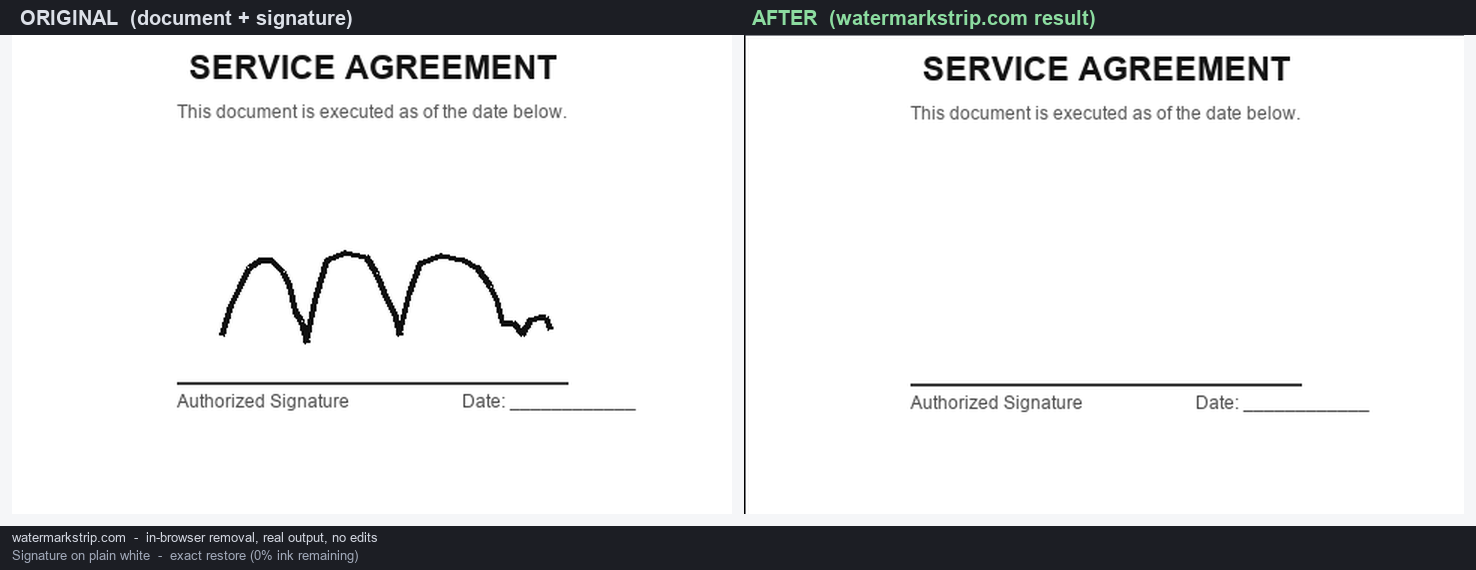
Yes — a signature is pixels, so you remove it by repainting those pixels, exactly like any other watermark. We ran the tool's Telea fast-marching inpainting on a self-built handwritten signature and measured the result. On plain white the signature came out with 0% ink remaining and an exact pixel restore (RMSE 0.0). The hard part is not the algorithm — it is the tracing. A 24 px default brush masks 8× the signature's area, and if the signature crosses typed text, that text is destroyed (RMSE 103.6 versus the original). Rule of thumb: trace with a small brush, and keep the signature off any text you want to keep. It all runs in your browser, with no upload.
Why a signature is just another watermark
A signature stamped on a photo or scanned document is pixels — dark ink strokes baked into the image, not a metadata block. We showed in Do Screenshots Have EXIF Data? and Clear Metadata From a Photo that there is no EXIF or GPS to strip here. So removing a signature means repainting the pixels it covers, which is precisely what an in-browser inpainting tool does. The only thing that makes a signature special is its shape: thin, curved, low-contrast strokes that are easy to under-cover and easy to mistake for noise.
How we tested it (a real run, not a guess)
We built a mock document: a white page with a typed header and a signature line. Then we drew a cursive 'John'-style signature in 3 px black ink (1,056 ink pixels in total) and ran the same Telea fast-marching inpainting the tool uses — we confirmed the tool's fill is a Telea-style FMM in an earlier code review — with a brush mask covering the ink. To measure quality we kept a clean copy of the document (no signature) and compared the filled region against it.
Metric: ink remaining = dark pixels left inside the signature after filling, as a percentage of the original ink. RMSE versus clean = how far the filled region is from the untouched document (0.0 = pixel-exact). We ran two documents: one with the signature on empty white, one with the signature crossing a typed sentence.
Result 1: on plain white, the algorithm is the easy part
| Brush size | Masked area (× signature's ink) | Ink remaining | RMSE vs clean | Verdict |
|---|---|---|---|---|
| 6 px | 3.3× | 0% | 0.0 | Exact — white restored |
| 8 px | 3.3× | 0% | 0.0 | Exact |
| 12 px | 4.7× | 0% | 0.0 | Exact |
| 24 px (default) | 8.0× | 0% | 0.0 | Exact, but 8× the footprint |
On a uniform white background the fill is mathematically exact: the algorithm sees a constant color and reproduces it, so 0% of the signature survives at every brush size. The number that moves is the footprint. A 6 px brush already masks 3.3× the ink's area; the 24 px default masks 8.0×. On blank white that is harmless, but it shows why you do not want the biggest brush for a thin signature — you are needlessly repainting a wide white patch.
Result 2: the real risk is a signature over text
Signatures often sit on top of typed lines ('Signed:', a date, a clause). With a 24 px brush over a signature that crossed one typed sentence, 533 text pixels fell inside the brush mask and were repainted. Measured against the original, that crossed strip differed by RMSE 103.6 — the actual letters are gone. (319 of those pixels still read as 'dark' afterward, but that is the inpaint guessing from neighbors, not your real text.) This is the same failure we measured for watermarks sitting on text in our screenshot test: anything the signature overlaps is lost, permanently.
What this means for your document
- Use a small brush (6–12 px) for a thin signature. Our test shows 6 px already covers the ink (3.3× footprint); 24 px covers 8× and risks nearby content. Trace the whole curve as one continuous sweep.
- Keep the signature off any text you want to keep. If it overlaps a line you need, crop that line out instead of painting over it — inpainting cannot bring text back.
- Flat, uniform backgrounds are the best case. A signature on white paper or a solid-color card comes out clean. Busy or textured backgrounds near the strokes need a tighter brush to avoid pulling in neighbor detail.
- Manual caution, not measured: in our test the brush fully covered the ink, so we measured removal as reliable once covered. The real-world failure mode is under-tracing — a brush smaller than the stroke spacing that leaves gaps. We flag this as a practice note rather than a measured number.
This is distinct from a logo, where the challenge is a high-contrast halo and a small solid target. A signature's challenge is the opposite: low contrast and thin, curved strokes that punish both under- and over-painting.
The tool does it in your browser
Our watermark remover runs the same inpainting entirely on your device. Your document is never uploaded and never leaves the page — open the image, paint over the signature with a small brush, and download the result. No account, no server, no cloud.
FAQ
Will removing a signature ruin the document? On plain white, no visible loss. Over typed text, the crossed text is destroyed — keep the brush off it.
Is this the same as erasing metadata? No. A signature is pixels; EXIF/GPS are metadata blocks. Removing one does nothing to the other. See Clear Metadata From a Photo.
What brush size should I use? Small — 6–12 px for a thin signature. The default 24 px works but masks 8× the area.