When Watermark Removal Fails: Five Backgrounds, Measured Against Ground Truth
The watermark disappears every single time. The question is what replaces it. We painted one identical brush stroke over one identical watermark on five backgrounds we generated ourselves - smooth gradient, fine 4-pixel stripes, a hard two-tone edge, a periodic 25-pixel grid, and random grey noise - and compared the result pixel by pixel against the original we hid it under. Across all five runs the painted stroke covers the same 24,109 pixels in every run and not one pixel outside that stroke ever changes; 0 outside the stroke. So the tool stays in the box you painted, but inside that box it replaces everything, the clean background and the watermark together.
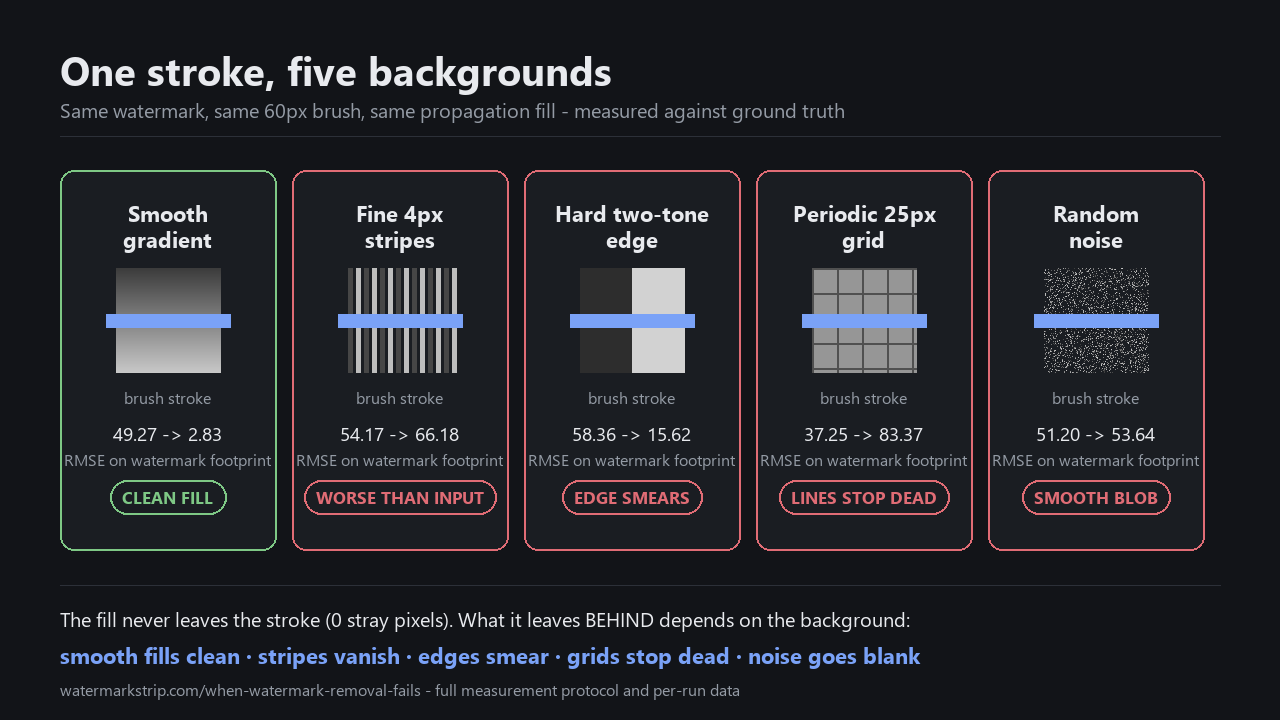
The clean background under the brush matters more than the watermark itself. On the smooth gradient (49.27 -> 2.83 RMSE on the watermark footprint, collateral 0 -> 2.42) the fill is near-perfect. On the fine stripes the same fill makes the result worse than the input (footprint 54.17 -> 66.18, gradient of the original was 60, of the result is 4) - the stripes vanish. On the hard edge (58.36 -> 15.62 footprint, but 27.57 -> 86.14 in the 9-pixel band straddling the edge) the boundary smears. On the periodic grid (37.25 -> 83.37) the lines stop dead where the stroke begins. On random noise (51.20 -> 53.64) the result is a smooth blob the size of the stroke.
Tested: the result is not 'what was under the watermark' - it is 'what was at the edge of the stroke, propagated inward until the stroke was filled'. The width of the stroke and the frequency of what's next to it set the ceiling on quality.
What we measured and how
All five 800x600 test images were generated in Python (Pillow), so we know exactly what was hidden under the watermark before the tool ever saw the image.
- Backgrounds. 1) A smooth left-to-right grey gradient. 2) Fine vertical stripes, period 4 pixels, values 70 and 190. 3) A hard vertical edge - left half colour (45,45,45), right half (210,210,210). 4) A periodic 25-pixel grid on a flat light grey field. 5) Per-pixel random grey, range 60-200, seeded for reproducibility.
- Watermark. The same white "WATERMARK" text on every background, alpha 47% (120/255), with a soft dark shadow two pixels offset. Pixels it actually covered: 8,821 / 8,760 / 8,748 / 8,808 / 8,795 respectively (whole image).
- Stroke. One scripted horizontal line, image-space coordinates (220,300) -> (580,300), brush size 60. Replicated exactly via mouse.move in Playwright on every run. Identical geometry every time.
- Tool. The real site page, served via file://, with the script clicking the actual Remove button and waiting for the real Download button to appear. Five separate page sessions, one per background. Remove step took 143-155 ms per run.
- Export. PNG, taken through the page's own canvas.toBlob() export path. Lossless; export compression cannot contaminate the measurement.
Because we generated the background ourselves, every number below is compared against a known ground truth, not against another tool or a guess.
The one number that frames everything: zero pixels outside the stroke
Before talking about quality, we answered the 'does it stay in the box' question. For every run, the exported PNG was compared pixel-by-pixel against the input PNG.
- Outside the painted stroke: max channel difference = 0 for every one of the five runs. The tool never touches a pixel you did not paint.
- Inside the painted stroke: on the smooth gradient, 23,285 of 24,109 painted pixels changed; on the periodic grid, 23,210; on the noise, 23,998; on the stripes, 23,836; on the hard edge, only 10,038 (because the propagated value matched the constant dark or light colour on either side of the edge). The painted stroke covered 24,109 pixels every time; what changed inside it depended on whether the surrounding background happened to coincide with the fill.
That property - the tool modifies exactly the painted pixels and nothing else - is checked in the code, not promised. It is also what the lossless, deterministic engine implies: app.js contains zero calls to Math.random (grep -c "Math.random" app.js = 0), and the brush is in image pixels (rad = brush.value / 2, verified), so the same input + the same mask produces the same output, byte for byte.
Smooth gradient - the case where it works

- Watermark footprint: 49.27 RMSE before, 2.83 after (-94.3%).
- Collateral (painted but not covered by the watermark): 0.00 RMSE before (the original was already correct there), 2.42 after.
- Max channel error after: 6 (out of 255). Visually undetectable.
- Ring 0 (outermost, 1 px from boundary): 1.57 RMSE after. Ring 23 (innermost, 24 px from boundary): 3.03 RMSE after. The fill is best at the edge and gets very slightly worse toward the middle, exactly what a propagating fill should do on smooth content.
The fill is near-perfect here for a simple reason: the only "information" the fill needs to invent is "continue this gradient", and the gradient provides that information at every pixel on the boundary of the stroke.
Fine 4-pixel stripes - the result is worse than the input

- Watermark footprint: 54.17 RMSE before, 66.18 after (+22.2%). The output is further from the original than the input was.
- Collateral: 0.00 before, 66.50 after. Every clean stripe inside the stroke was destroyed.
- Detail (mean luminance gradient in the stroke): original 60.02, output 3.71. The fill kept 6.2% of the original structure.
- Ring 0: 67.12 RMSE after. Ring 23: 65.21. The error is already at the ceiling on the outermost ring - the stripes are gone everywhere inside the stroke, not just deep inside it.
- Max channel error after: 120, at pixel (415,270) - inside the first row of the stroke.
This is the failure mode the page naming "works best on small to moderate overlays on relatively uniform backgrounds" (used by every competitor page) describes without quantifying. Here it is quantified: the fill averages nearby pixels, the stripes are smaller than the averaging radius, so they cannot survive propagation. If your real photo has anything finer than roughly a brush-width across it (fine fabric weave, hair, foliage, halftone, cross-hatching), expect the same.
Hard two-tone edge - the watermark goes, the edge smears

- Watermark footprint: 58.36 RMSE before, 15.62 after (-73.2%). On the strong side the fill is doing useful work.
- Collateral: 0.00 before, 16.88 after. The fill replaces the constant dark/light areas with near-constant values, which is fine on its own.
- The story is in the boundary. Pixels within +/-4 image pixels of x=400 (the hard edge): 27.57 RMSE before, 86.14 after. Pixels more than 4 px from the edge: 35.31 before, 10.41 after. The fill is correctly recovering the two flat areas and incorrectly smearing the transition between them.
- Max channel error after: 165, at pixel (400,270) - the edge itself.
The error is not spread across the stroke; it is concentrated in a narrow band on the structural boundary. That is what propagation across a discontinuity looks like. If your real photo contains a watermark that straddles a strong edge - a logo over a wall corner, text over a horizon, a brand mark over a building edge - that edge will be softened where you pulled from both sides of it.
Periodic grid - the lines stop dead

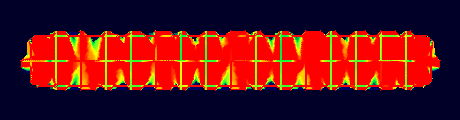
- Watermark footprint: 37.25 RMSE before, 83.37 after (+123.8%).
- Collateral: 0.00 before, 79.28 after.
- Detail kept: 36.1% of the original gradient energy survives.
- Ring 0: 62.60 RMSE after. Ring 23: 83.60. Error is high on the outermost ring and grows inward - because the cut grid lines propagate into the stroke and look nothing like the original grid.
Propagation cannot invent continuation. The grid line that arrived at the boundary of the stroke from the left at row y=200 stops at the stroke's edge; the fill line at row y=200 inside the stroke is whatever Telea produced by averaging nearby values, which is not a continuation of the original line. Real photos with regular structure (brick walls, tile floors, fences, window blinds, fabric weaves, horizontal siding) will show the same: the structure is gone wherever you paint.
Random noise - a smooth blob the size of the stroke

- Watermark footprint: 51.20 RMSE before, 53.64 after (+4.7%, essentially unchanged).
- Collateral: 0.00 before, 52.21 after.
- Detail kept: 7.6% of the original gradient energy (mean gradient 94.43 -> 7.19).
- Ring 0: 54.25 RMSE after. Ring 23: 54.08. Error is flat across the stroke - every ring is equally bad.
- Max channel error after: 140.
Noise is the unconditional worst case for any propagation fill: there is no pattern to propagate, so the fill averages whatever it finds at the boundary, and what you get back is a smooth grey patch the shape of your stroke. High-ISO photos, sensor grain on a flat surface, and JPEG-compressed photos (which carry DCT-block artefacts that are not predictable from one block to the next) sit close to this case.
What the ring numbers actually tell you
The ring decomposition splits the painted stroke into 24 bands by distance from the stroke boundary, 1 pixel thick on the outside, growing inward. For a propagating fill on smooth content, error should grow roughly linearly with distance: the fill is best where it has the most nearby boundary to sample from. The data:
- Smooth gradient: ring 0 = 1.57, ring 23 = 3.03. Error roughly doubles across the depth. Linear-ish, as expected.
- Fine stripes: ring 0 = 67.12, ring 23 = 65.21. Already at the ceiling at the boundary. Depth buys nothing because the ceiling was hit on ring 0.
- Hard edge: ring 0 = 11.05, ring 23 = 19.45. Error grows inward, consistent with the fill smearing progressively across the boundary.
- Periodic grid: ring 0 = 62.60, ring 23 = 83.60. Error grows inward - the grid lines that survived ring 0 are themselves being averaged out by ring 23.
- Random noise: ring 0 = 54.25, ring 23 = 54.08. Effectively constant. Depth is irrelevant.
Practical version: "make the brush a bit smaller and do multiple passes" only helps in the first case. On structured backgrounds the failure is structural, not a depth problem.
The four honest failure modes and what to do about each
- Background is finer than roughly the brush width. Fine stripes / fabric / hair / halftone. The detail vanishes because propagation averages pixels that are smaller than the averaging radius. Brush range is 4 to 120 pixels (index.html line 29); smaller brush does not help, only narrows the affected area. Fix: do not remove it. Crop, re-shoot, or replace the background. No propagation-based tool will fix this; a generative fill would be the alternative, but generative fills invent pixels, which is a different trade.
- Watermark crosses a strong edge. Logo over a building corner, text over a horizon. The edge smears. Smaller brush does not help - the smear is set by the colour difference across the edge. Fix: mask only the side of the watermark that sits on the uniform background, paint carefully up to but not across the edge. The edge then stays sharp.
- Watermark lies over regular structure. Brick, tile, blinds, siding, fences. Lines stop dead. Brush size does not help. Fix: if a single line is more important than the rest, paint only it and accept the surrounding lines as collateral; or paint the entire structure and re-overlay the regular pattern from a known template afterwards.
- Background is high-ISO noise, grain, or DCT-block artefacts. The fill is a smooth blob. Brush size does not help. Fix: re-shoot at lower ISO; for the JPEG case, feed the highest-quality source you have (the q90/q60 case is in a separate test). Adding noise back on top after removal looks worse than the original.
How the run was verified to be honest
- Engine determinism. grep -c "Math.random" app.js = 0. The output is fully determined by the input plus the mask; there is no sampler, no model, no random initialisation.
- Outside-stroke guarantee. For every one of the five runs, every pixel outside the painted stroke was byte-identical to the input file (max channel difference 0 across the full image).
- Mask geometry. Replicated exactly: paint_mask() in the analysis script uses the same stampMask()/lineMask() rasterisation that app.js uses (dx*dx + dy*dy <= r*r, stepping along the stroke at rad/2 spacing (rad = brush/2; app.js line 72)). The painted stroke was 24,109 pixels every run.
- Export path. The downloaded image was produced via the page's own canvas.toBlob("image/png") export, not a screenshot. No screenshot capture, no resampling, no metadata loss.
- Self-contained. All five test images were generated in this directory by make_sources.py, with the watermark overlay drawn deterministically and the clean original saved alongside for direct comparison.
All five strip images on this page and the error map are the actual outputs from those five runs, not stock photos or competitor screenshots.