Generative vs Propagation Watermark Removal: Does Your Result Contain Pixels the AI Invented?
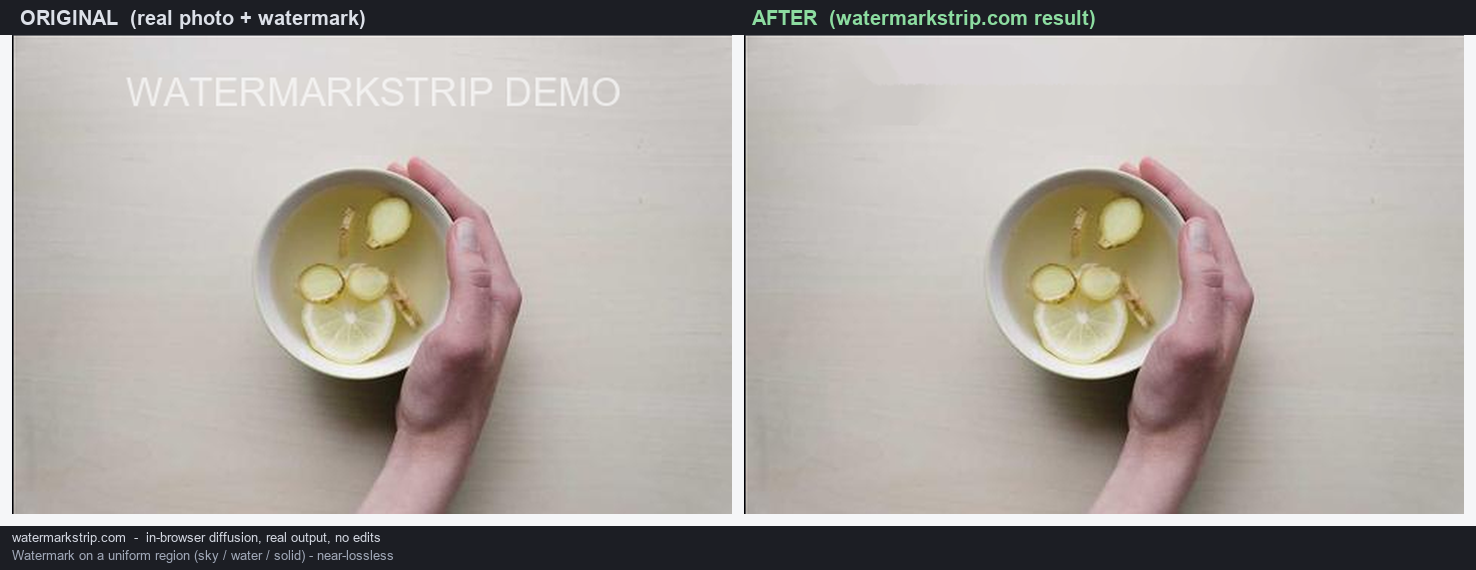
That is the first question to ask about any AI watermark remover, and almost nobody asks it. A generative remover predicts what it believes was underneath the watermark, using a model trained on other people's images — the pixels it writes did not come from your photo. A propagation remover has nothing to predict with: it takes pixels from the edge of the hole and blends them inward, so every pixel it writes is a weighted average of pixels already in your image.
WatermarkStrip is the second kind, and this is a statement about code, not a promise. The fill routine adds up neighbouring pixel values multiplied by non-negative weights and divides by the sum of those weights. A weighted average built that way cannot produce a value outside the range of the pixels it averaged. There is no model, no training set, and no network call anywhere in the path — so there is nothing that could contribute a pixel your image did not already contain.
The trade-off is real and it runs in both directions: because it cannot invent, it will smear or blur when the area behind a watermark has structure it cannot copy from the surroundings. It fails by looking wrong. A generative tool fails by looking right.
Why this should be your first question, not your last
Two removers can produce results that look equally clean and be different in a way that matters enormously. One reconstructed the area from your own pixels. The other produced a plausible picture of what it guessed was there.
If the image is decoration — a slide, a thumbnail, a mood board — the difference is academic, and you should pick whichever looks better. If the image is a record of what was actually in front of the camera, the difference is the whole point: an accident scene, a property condition, a product defect, a medical image, a screenshot submitted as evidence, a news photograph. In those cases a filled region that was never photographed is not a cleaner image. It is a different image.
So the useful question is not “which output looks best”. It is: can this tool write a pixel that was not in the source image? Answer that, and most of the rest follows.
What propagation fill actually does here
The comment above the fill routine in this site's own script names the method and describes it in one sentence:
“Fills the masked region by propagating known pixels inward, in order of distance from the boundary, weighting each source by how well its gradient points toward the target pixel.”
In practice that means the pixels where your mask meets untouched image go into a queue sorted by distance, the nearest one is filled first, the newly filled pixel counts as solid ground, and the front advances one ring deeper until the hole closes. Pixels you did not paint are never modified.
The part worth checking is the blend itself. Each new pixel is computed as a sum of neighbouring known pixel values times a weight, divided by the sum of those weights — and the weight is clamped so it can never be negative. When every weight happens to be zero, it falls back to a plain unweighted average of the known neighbours. Both branches are averages of pixels that were already in your picture.
Two consequences follow directly from that arithmetic, and neither is a marketing claim:
- No filled pixel can be brighter than the brightest neighbour it averaged, or darker than the darkest. A weighted average with non-negative weights stays inside the range of its inputs.
- No structure can appear that was not present somewhere nearby. The fill can only move existing values into the hole. It cannot produce a new texture, a new edge orientation, or an object that the surrounding pixels did not already imply.
That is also exactly why it struggles. If a watermark covers something with fine structure — foliage, fabric weave, small text, a crowd — there is nothing nearby to copy that structure from, and the result is a smooth smear. The tool is not being conservative out of politeness. It genuinely has no source for that detail.
What generative fill does, in the words of the tools that sell it
This is not a criticism of those tools; predicting a background is often what you want, and it frequently looks better. But their own copy is explicit about the mechanism.
goenhance.ai answers its own FAQ question “How does the AI watermark remover work?” with:
“The AI uses a deep learning model trained on millions of images. It identifies the watermark's pixels and intelligently reconstructs the image area underneath by predicting the original background, ensuring a clean and natural result.”
It also lists, as a capability, that the tool works “rather than masking the watermark, it rebuilds the underlying details”.
basedlabs.ai describes the same step on its AI watermark remover page: the AI “analyzes the surrounding pixels to intelligently reconstruct what should be underneath”, and its Step 2 instructs you to pick a model — Seedream 4 or Quen — from a dropdown, with a prompt along the lines of “remove watermark, reconstruct background, preserve texture, match lighting and grain”.
Read those literally, because they are accurate descriptions. Predicting the original background means producing a value the model considers likely, given what it learned from a training corpus. The surrounding pixels of your photo are an input to that prediction — they are not its only source.
My reading, stated as inference rather than as something I measured: because the prediction is generated by a model rather than copied from your image, the filled region can contain values and structures that existed nowhere in the source photograph — a continuation of a railing, a window, a pattern — that is entirely plausible and entirely invented. I have not run a controlled experiment to demonstrate this; it follows from what the mechanism is.
The two failure modes, and why one of them is dangerous
Everything below this heading is my reasoning about the two mechanisms, not a measured benchmark. I am labelling it because it is analysis, and you should be able to tell which parts of a page are evidence.
- Propagation fails loudly. When it lacks source detail, you get blur, smearing, or a visible patch. It is annoying and it is obvious. You can see it failed and try a different approach.
- Generative fails quietly. When the model guesses wrong, it usually still produces something coherent — a texture that continues convincingly, a background that looks finished. It does not look like an error, because a plausible wrong answer and a right answer look the same in a single image.
That asymmetry is what makes “does it invent pixels” the deciding question rather than a technical footnote. A tool that fails visibly lets you catch the failure. A tool that fails invisibly removes your ability to tell.
Which suggests a simple rule of thumb: if you will ever need to say “this is what the camera recorded”, prefer the tool that fails visibly. If you need an image that simply looks finished, a generative tool will often give you a nicer result, and you should use one.
How to check any remover yourself in a few minutes
You do not have to take anyone's word for which category a tool falls into, including mine. All four of these are things you can run on any remover, including this one.
- The clean-original test. Take a photo you also have an unwatermarked copy of. Add a watermark to the copy, run it through the remover, then compare the result against the true original. Any systematic difference in the filled region is content the tool supplied itself. This is the strongest test and it takes one image.
- The strict-geometry test. Put a watermark over something with rigid structure — a straight edge, a grid, a row of windows, lines of text. A propagation fill keeps the geometry continuous where it can and visibly gives up where it cannot. A generative fill may continue the structure confidently in a direction that was never there.
- The range test. For a propagation tool specifically: no filled pixel can fall outside the value range of the pixels it averaged. Sample a few pixels inside a filled area on flat mid-grey background and compare them to their immediate surroundings. A value brighter or darker than everything around it means something other than your image contributed.
- The offline test. Load the page, disconnect your network completely, and run a removal. If it still completes, no remote model was involved in producing those pixels — a model large enough to reconstruct backgrounds does not run in a browser tab with the network down. If it stops working, the fill was not happening on your machine.
The first and fourth tests are described in more detail in Does an AI watermark remover upload your image?, and the fill mechanics are walked through step by step in How in-browser watermark removal actually works.
What this tool does and does not do
Stated plainly so you can decide before you start rather than after:
- It fills by propagation only. No model, no prediction, no inference step. It cannot invent a pixel and it cannot recover structure that is not available nearby.
- You paint the mask yourself. There is no automatic watermark detection. That is deliberate: automatic detection is itself a guess about which pixels belong to the watermark.
- Still images only. No video, and no batch processing — each image is handled on its own.
- Input: PNG, JPG, JPEG, WebP, BMP, GIF. Output: PNG or JPEG, your choice.
- It runs in your browser. The removal path contains no fetch, no XMLHttpRequest, no WebSocket and no sendBeacon, and the project contains no external URLs at all.
If your priority is a beautiful reconstruction of a large missing area, a generative tool will usually beat this one and you should use it. If your priority is knowing that every pixel in the output came from the photo you took, that is the thing this page exists to give you.
Where the claims on this page come from
- The description of this site's fill is read directly from its own source: the method comment above the inpainting routine, and the blend arithmetic that follows it. Both are in a single file you can open and read.
- The quoted sentences from goenhance.ai and basedlabs.ai are reproduced as published on their pages, read 2026-09-21. They are quoted to attribute the mechanism, not to review or rank those products.
- The section on failure modes is analysis, and is labelled as analysis in the text.
- This page contains no traffic estimates, difficulty scores, rankings, index counts or click counts. I did not measure any of those and I am not going to put a number here that I cannot trace to a source.