What Is EXIF Data? The 1,723 Bytes That Hide Inside Your Photo
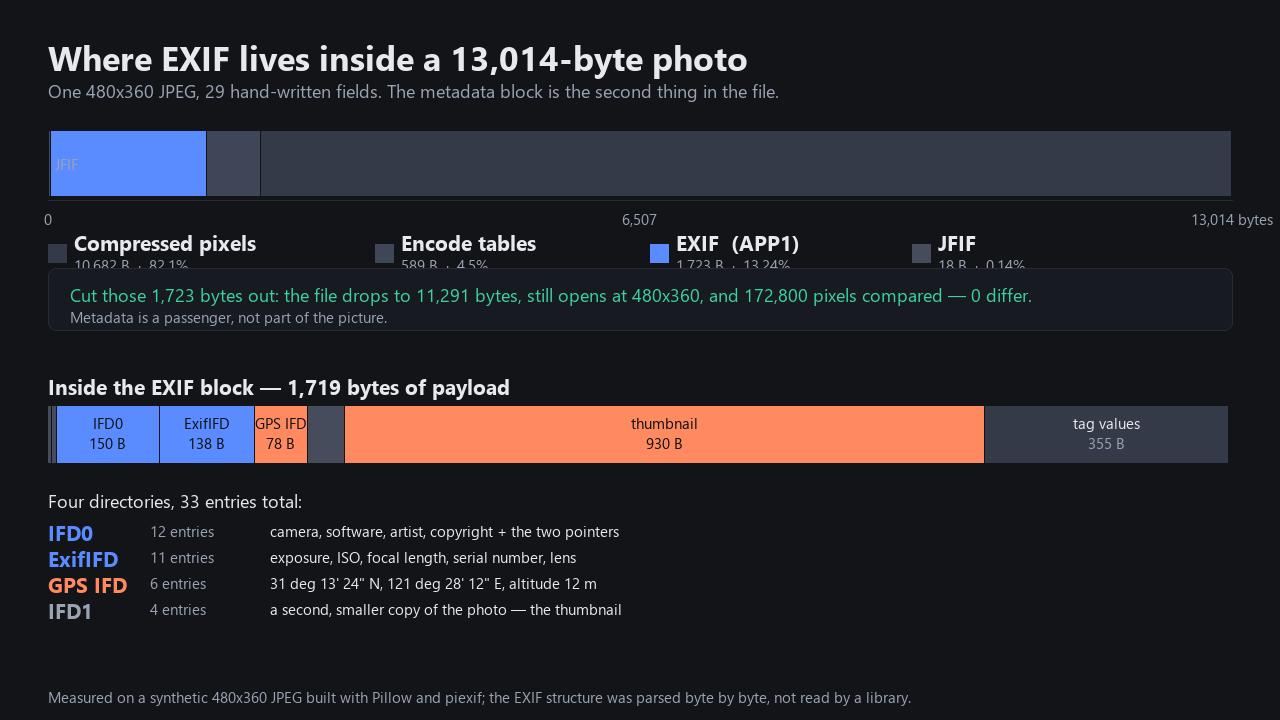
EXIF is the metadata block your camera writes into the photo at the moment you press the shutter - camera model, lens, exposure, the date and time, often your GPS coordinates, and usually a small hidden copy of the photo itself. It is a standard called the Exchangeable Image File Format, currently maintained as CIPA DC-008-2026-E (EXIF 3.1). We built a 13,014-byte JPEG with 29 hand-written fields and parsed the file byte by byte: the EXIF block lives in bytes 20 through 1,742, takes up 13.24% of the file, and contains a 930-byte thumbnail that most users do not realize is there. Cut those 1,723 bytes out and the photo opens at the same 480x360, with 0 of 172,800 pixels changed - the metadata is a passenger, not part of the picture.
The same fields appear under two different search phrases (what is exif data, exif data explained); they describe the same block, so we cover both here.
The definition, from the people who maintain the standard
EXIF is documented by CIPA (the Camera & Imaging Products Association) and by the tooling that implements it. The official EXIF tag reference maintained by Phil Harvey for ExifTool says it this way:
EXIF stands for "Exchangeable Image File Format". This type of information is formatted according to the TIFF specification, and may be found in JPG, TIFF, PNG, JP2, PGF, MIFF, HDP, PSP and XCF images, as well as many TIFF-based RAW images, and even some AVI and MOV videos.
That same page tells us which standard the underlined tag names belong to:
Tags which are part of the EXIF 3.1 specification have an underlined Tag Name in the HTML version of this documentation. See https://www.cipa.jp/std/documents/download_e.html?CIPA_DC-008-2026-E for the official EXIF 3.1 specification.The ExifTool tag table is the de-facto reference for which tag ID means what; we used it to label every byte in the next section. For a plain-language restatement, the EXIF viewer site photometadata puts it like this:
EXIF is a standard that defines how metadata is embedded inside image files. When you take a photo, your camera or phone automatically writes dozens of data fields into the file itself - things like the camera model, lens settings, date and time, and often your GPS coordinates.
Honest note on sourcing: we could not download the CIPA PDF itself - the official download page at cipa.jp requires a click-through disclaimer we did not complete - so the version label "EXIF 3.1 / CIPA DC-008-2026-E" above is taken from the ExifTool official tag reference, which links to it. Every other number on this page comes from our own run on a 13,014-byte synthetic JPEG.
The test photo: 29 fields we wrote by hand
To dissect EXIF you need a file whose contents you control. We built a 480x360 JPEG with Pillow 12.3.0 and piexif on Windows, then wrote 29 fields ourselves (no phone involved) and embedded a 160x120 JPEG as the EXIF thumbnail. The categories mirror what a real camera writes:
- IFD0 (10 fields):
Make,Model,Software,Artist,Copyright,DateTime,Orientation,XResolution,YResolution,ResolutionUnit- plus two pointers (ExifIFDPointer 0x8769,GPSInfoIFDPointer 0x8825) that point to the other directories. - ExifIFD (11 fields):
ExposureTime,FNumber,ISO,DateTimeOriginal,DateTimeDigitized,FocalLength,LensModel,BodySerialNumber,ColorSpace,ExifImageWidth,ExifImageHeight. - GPSIFD (6 fields):
GPSLatitudeRef= N,GPSLatitude= 31 deg 13' 24.00" N,GPSLongitudeRef= E,GPSLongitude= 121 deg 28' 12.00" E,GPSAltitudeRef= sea level,GPSAltitude= 12 m. - IFD1 (2 fields): a stripped-down copy of
Make+Model, plus the two thumbnail pointers.
The JPEG without EXIF is 11,291 bytes; with EXIF, 13,014 bytes - so 1,719 bytes (the EXIF payload) plus the 4-byte APP1 marker/length = 1,723 bytes of overhead. That is the entire metadata block, on disk.
Where EXIF physically lives: bytes 20-1,742 of 13,014
The first 48 bytes of a JPEG are pure header. Here are the first 48 bytes of our test photo, hex (16 bytes per row, file offsets in brackets):
[ 0] FF D8 FF E0 00 10 4A 46 49 46 00 01 01 00 00 00
[16] 00 01 00 00 FF E1 06 B9 45 78 69 66 00 00 4D 4D
[32] 00 2A 00 00 00 08 00 0C 01 0F 00 02 00 00 00 1B
Reading it row by row:
FF D8at offset 0 - SOI, "this is a JPEG".FF E0 00 10 4A 46 49 46 00at offset 2 - APP0 JFIF segment, 16 bytes long, identifier"JFIF\0". This is the image container, not metadata.FF E1 06 B9at offset 20 - APP1 segment. The06 B9= 1,721 is the segment length field; the segment runs from byte 20 to byte 1,742 inclusive (1,723 bytes total = 13.24% of the file).45 78 69 66 00 00at offset 24 - the EXIF identifier, ASCII"Exif\0\0". This is how EXIF says "my data starts here".4D 4Dat offset 30 - TIFF byte order, big-endian (Motorola, soMM).00 2Aat offset 32 - the TIFF magic number 42.00 00 00 08at offset 34 - the offset, from the TIFF header, to the first IFD (IFD0) - in our case, 8 bytes in.00 0Cat offset 38 - "IFD0 contains 12 entries" (the two extras are the ExifIFDPointer and GPSInfoIFDPointer, which the camera writes by itself).
The JPEG then continues with DQT / SOF0 / DHT segments between bytes 1,743 and 2,331, and the actual SOS (start of scan, marker FF DA) at byte 2,332 - the first byte of compressed pixel data is right after. So the metadata block is a separate object that lives entirely in the first ~13% of the file, before any pixel data is written.
Inside the block: four directories, 33 entries
Once you are past "Exif\0\0", the rest is a TIFF directory tree. Our file contains four Image File Directories (IFDs), each one a small table of entries with a tag ID, a type, a count, and either an inline value or a pointer to a value elsewhere in the block:
- IFD0 at TIFF offset 8 - 12 entries, 150 bytes of structure. Holds the "image as a whole" fields (
Make,Model,Software,Artist,Copyright,DateTime,Orientation,XResolution,YResolution,ResolutionUnit) and the two pointers. - ExifIFD at TIFF offset 317 (pointed to by IFD0 entry
0x8769) - 11 entries, 138 bytes of structure. Holds the camera-at-shoot-time fields (ExposureTime,FNumber,ISO,DateTimeOriginal,FocalLength,LensModel,BodySerialNumber, dimensions, color space). - GPSIFD at TIFF offset 555 (pointed to by IFD0 entry
0x8825) - 6 entries, 78 bytes of structure. HoldsGPSLatitudeRef,GPSLatitude,GPSLongitudeRef,GPSLongitude,GPSAltitudeRef,GPSAltitude. - IFD1 at the next-IFD offset that IFD0 ends with - 4 entries, 54 bytes of structure. A second, smaller directory that just describes the embedded thumbnail.
Add it up: 420 bytes of directory structure + 930 bytes of thumbnail + a few hundred bytes of inline/offset tag values + the 6-byte identifier = 1,719 bytes of payload. The thumbnail entry alone is 54.1% of the whole EXIF block - and that is where most "EXIF stripping" tools quietly leave it in. We tested this in Erase EXIF Data, Tested - one of the six deletion paths we checked writes the thumbnail straight back out.
Cut the block out: 13.24% of the file gone, zero pixels changed
The cleanest way to show that EXIF is independent from the picture is to remove it. We took the 13,014-byte file, located the APP1 segment at offset 20 with length 1,721, and reconstructed the file as data[:20] + data[1743:]:
- Original: 13,014 bytes, 29 EXIF fields, opens at 480x360.
- After cutting APP1: 11,291 bytes, 0 EXIF bytes, opens at the same 480x360.
- Bytes removed: 1,723 (13.24% of the file).
- Pixels compared: 172,800. 0 pixels differ.
If you are reading this in a browser, that means about an eighth of every JPEG you have ever opened was not pixels. The reason browsers and image viewers do not crash on EXIF-stripped files is that the JPEG decoder is happy with just the compressed image data; everything from byte 2,332 onward is enough.
EXIF is not the only metadata block
EXIF is one of three metadata blocks a photo can carry, and it is the only one written by the camera at the moment of capture. The other two:
- IPTC - captions, keywords, creator, credit, and copyright fields a person fills in (newsroom and stock-photo origin).
- XMP - the XML container that carries modern metadata;
.xmpsidecar files sit next to raw photos.
The photometadata FAQ puts the same distinction in plain words:
EXIF is one type of image metadata. Photos can also contain IPTC data (captions, keywords, copyright) and XMP data (editing history, ratings). EXIF specifically refers to the technical data recorded by the camera at the time of capture.
When you hear "metadata" in a privacy discussion, EXIF is usually the part that exposes the GPS coordinates and the device serial number. When you hear "metadata" in a stock-photo rights discussion, IPTC/XMP is usually the part that exposes the license.
Which formats actually carry EXIF (our test)
Not every image format stores EXIF the same way. We re-saved our 480x360 source from this page through Pillow into four formats, with the same EXIF blob, and inspected what each format did with it:
- JPEG (.jpg): writes the EXIF into an APP1 segment. PIL preserved 1,719 bytes in
image.info['exif']; file size 13,018 bytes. - PNG (.png): writes the EXIF into a single
eXIfchunk (the standard PNG EXIF chunk, ratified in 2023). PIL preserved 1,713 bytes; chunk list:IHDR (13 B),eXIf (1,713 B),IDAT (65,536 + 6,359 B),IEND. - WebP (.webp): writes the EXIF into an
EXIFRIFF chunk. PIL preserved 1,713 bytes; file size 3,748 bytes. - GIF (.gif): no support. PIL dropped the EXIF;
image.info['exif']= 0 bytes; file size 34,505 bytes.
Two takeaways. First, JPEG, PNG, and WebP all carry EXIF - and in every case the metadata block is a single discrete chunk that can be cut out in one go. Second, "the file is a GIF" is the only one of the four where EXIF is structurally impossible.
The PNG line in that list is the one people doubt most, so we built the case by hand and read the block back: does a PNG have EXIF data.
EXIF can be edited - and that matters
EXIF is unsigned. Every field is just a typed value the camera wrote into the file, and any tool that can open the file can rewrite any field. The photometadata FAQ puts it bluntly:
EXIF data can be edited, added, or removed using various tools. This means EXIF data alone should not be used as definitive proof of when or where a photo was taken, though it is useful as supporting evidence.
That has practical consequences. If a screenshot shows a date, it can be edited; if a photo is leaked and the GPS says a place, the GPS can be wrong; if your camera serial number ends up online, it is not a unique receipt for one specific frame. EXIF tells a story; it is not the story.
How to see it in your own photos
The same byte map applies to any JPEG, PNG, or WebP that you have. Three things we have published that read or change those bytes:
- Does Watermark Removal Keep EXIF? Tag by Tag - the test that found EXIF blocks disappear entirely when you process an image through this tool.
- Clear Metadata From a Photo (Tested) - the longer guide to the 18 fields that travel with a phone photo, and the three ways to scrub them.
- Erase EXIF Data, Tested - 34 fields plus a 14,612-byte hidden thumbnail, six deletion paths, three of them leaking.
- EXIF Orientation: Why Your Photo Rotates After Editing - the 2-byte display flag that never touches pixels.
Everything above is on this site; nothing here is uploaded. All three tools process the file in your browser and produce the result locally.